ClassPhoto IDs · $59 a year
Student IDs that
scan the first time.
The same export you already downloaded becomes CR80 cards for every student and every staff member. Six card designs in the school's own colors, logo and fonts, and a barcode that is generated, then read back by a second library, before an export is allowed to finish.
$59 a year. Unlimited cards and unlimited schools. Instant access. Free sample mode opens a 28-student sample school, or drop in your own export; exported cards carry a SAMPLE watermark.
Want to try one first? Every ClassPhoto tool includes a free sample mode. No account needed.
Sample output carries a SAMPLE watermark. IDs, ServiceStix and the Principal's Book give you the whole job that way; ClassPhoto's trial builds two classes, and List Fixer's downloads hold the first ten students. Already licensed? The same links open your app.
What it does
A whole school of ID cards, about ten minutes.
ClassPhoto IDs takes a zip, a folder, a CSV, an XLSX or a PSPA Index.txt with the photos, works out which file is the real roster, and works out which column is the student number. That last part matters more than it sounds: a GotPhoto export usually carries two data files, and picking the wrong one throws away every student ID, which is what a barcode is made of. The import report tells you exactly which column became which field, with a button to change it.
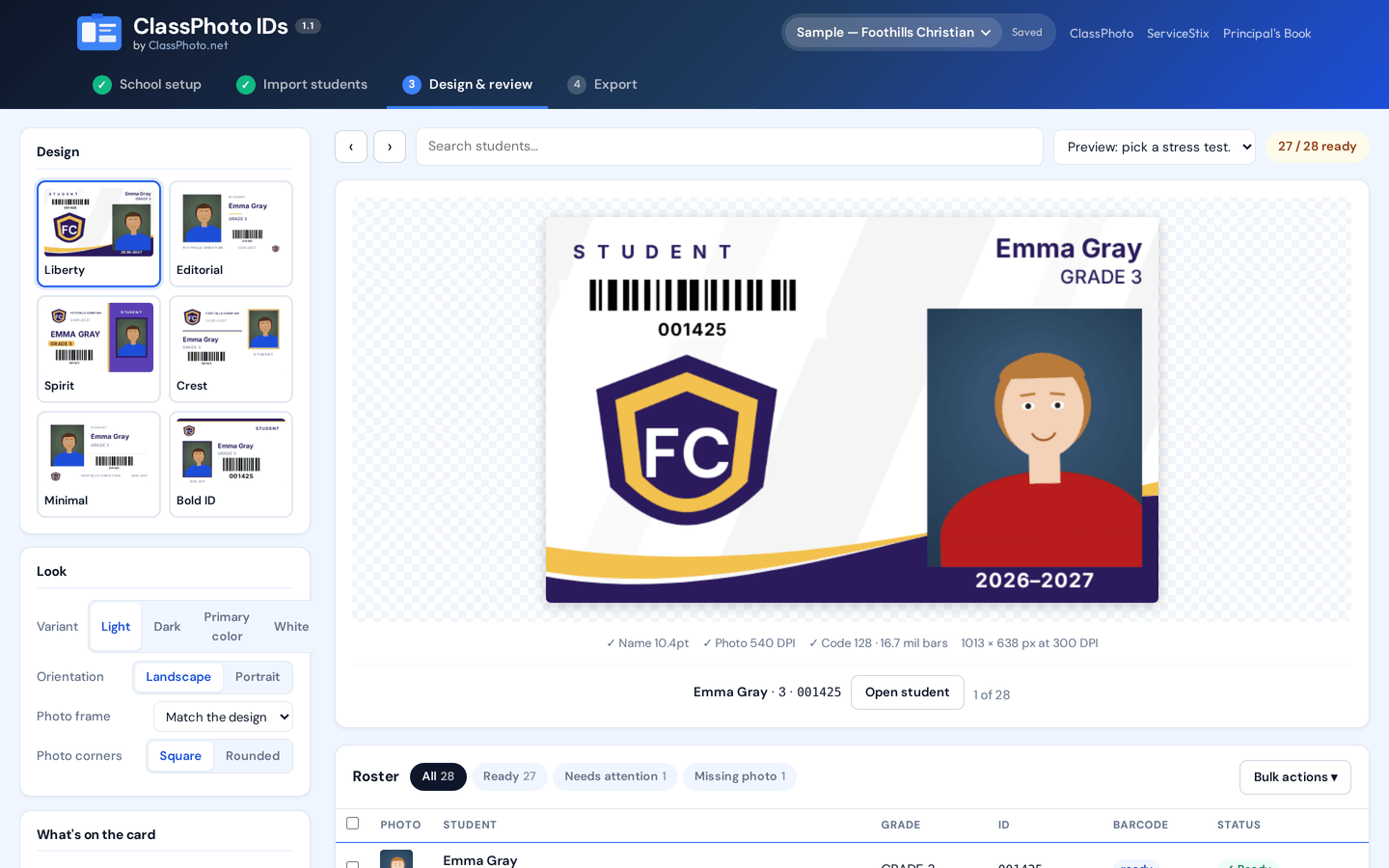
Then you pick a card. Six designs, four color variants, landscape or portrait, all wearing the school's own colors, logo and fonts. School logos usually arrive as a JPEG on a white box; the app spots that and offers to knock the white out in one click, keeping the white inside the artwork, with an undo.
Names always fit. Every card measures the real rendered name in the real loaded font and steps down through size, tracking and a condensed face before it will accept a smaller setting. Nothing is ever wrapped, clipped, or squeezed sideways. A name that genuinely cannot fit is reported in pre-flight, not quietly trimmed.
Barcodes always scan. Every barcode is generated, printed on a white plate with a proper quiet zone, then decoded again by a second, separate library. If a card fails to decode, the export stops. Contrast is measured against the real card background, and a light-on-dark barcode is flagged, because plenty of handheld scanners will not read an inverted one.
Crops are face-aware, and yours to override. Photos are cropped into each design's own photo rectangle with a face-aware crop that targets a consistent face size and leaves headroom for tall hair and bows. Manual crops are stored per student and survive a template or color change.
The workflow
Four steps, and one of them is picking colors.
Everything runs in your browser, on the computer you already have.
School setup
Name, year, card label, logo, colors and fonts. Colors can be pulled straight out of the logo. Save it as a brand profile and it is waiting next year.
Import students
Drop the whole export at once: a zip, a folder, a CSV, an XLSX or a PSPA Index.txt with the photos. Photos match on the roster's filename, then student ID, then name.
Design and review
Six card families, four variants, landscape or portrait. A live preview with stress-test shortcuts, a filterable roster, and a per-student drawer for edits, crops and a magnified barcode test.
Export
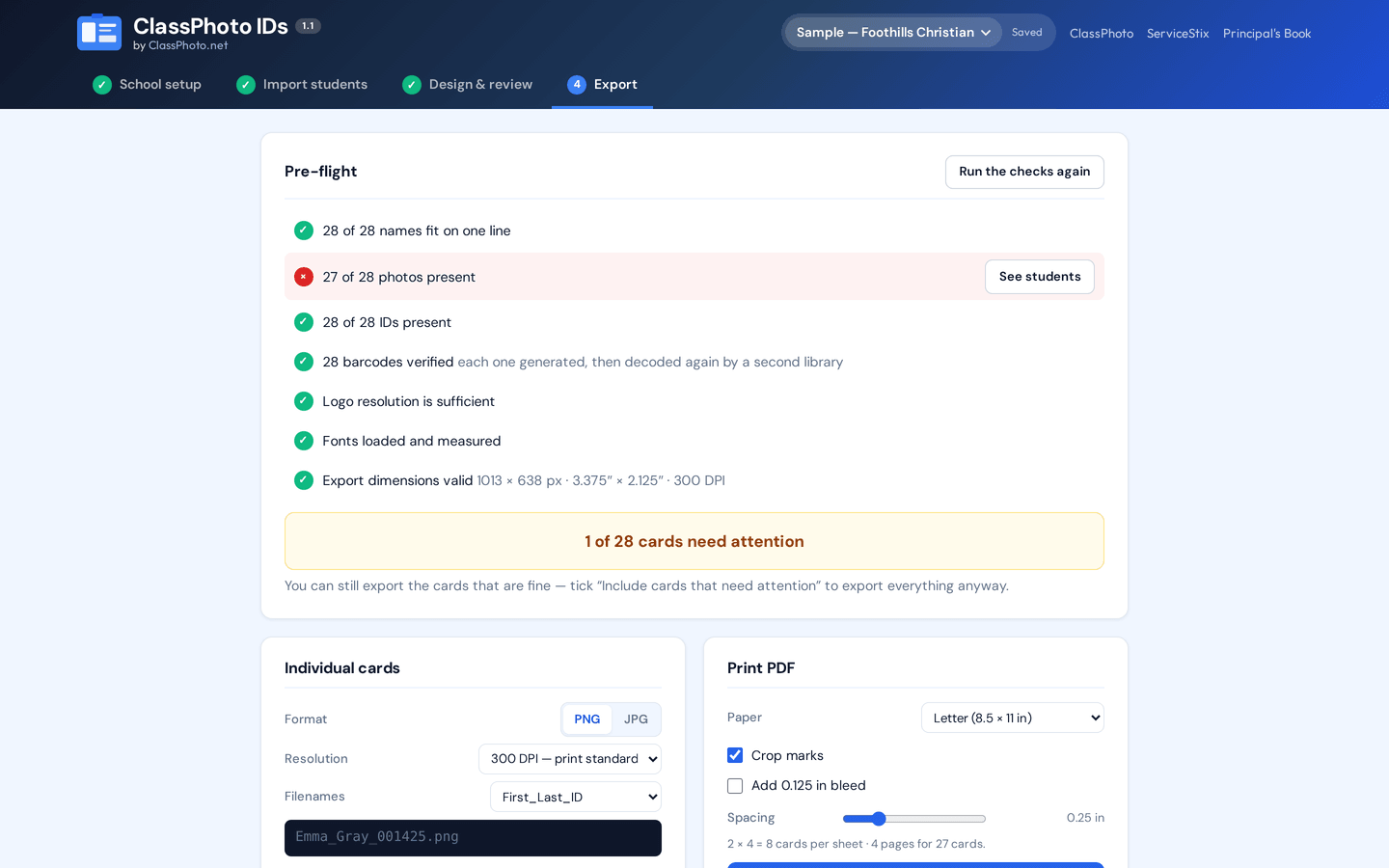
Pre-flight, then individual PNG or JPG in a zip, a multipage print PDF with crop marks and optional bleed, a CSV manifest, and a printable barcode test sheet.
Features
What ClassPhoto IDs does.
Built around the three things that ruin a card order: a name that does not fit, a barcode that does not scan, and a crop that cuts off a chin.
Six card designs
Liberty, Editorial, Spirit, Crest, Minimal and Bold ID. Four color variants each, landscape or portrait, all in the school's own colors and fonts.
True CR80
3.375 by 2.125 inches at 300 DPI, 1013 by 638 pixels, the same card stock every badge printer takes.
Barcodes verified by decoding
Code 128, Code 39 or QR, generated by one library and decoded again by another. An export aborts rather than shipping a card that failed to read.
Contrast that gets checked
The white panel behind the barcode can be turned off. When it is, the ink is picked to read against the actual card, and a marginal or inverted barcode is flagged.
Names that always fit
Size, tracking, a variable width axis, then a condensed face, measured against the real loaded font. Never wrapped, clipped, ellipsized or squeezed.
Face-aware crops
Each design owns its photo rectangle. Crops target a consistent face size and keep headroom for hair and bows, with a manual drag and zoom crop stored per student.
Logo white-box knockout
A logo that arrives on a solid white background is detected and knocked out in one click. White inside the artwork stays. There is always an undo.
Student IDs read correctly
Identifier columns are found by header and by content, and IDs stay strings from the moment they are read, so 001425 never becomes 1425.
Pre-flight before export
Names that fit, photos present, IDs present, barcodes verified, logo resolution, fonts loaded, export dimensions. You see the list before you commit.
Print PDF or image files
A multipage PDF with crop marks and optional bleed, eight landscape cards to a Letter sheet, six portrait, fewer with bleed, and Legal, Tabloid, A4, A3 or one card per page if you need them, with the exact grid shown before you export, or individual PNG and JPG files in a zip with a CSV manifest.
Screenshots
The app, on real sample data.
Both of these are the live app at classphotoapp.netlify.app, loaded with its built-in sample school of 28 deliberately awkward students.
Pricing
One price, unlimited cards.
No per-card fees and no per-school fees. Cancel any time.
ClassPhoto IDs
$59/yr
Billed annually. Instant access.
Sold separately, or in the Suite.
- Unlimited student and staff ID cards
- Six card designs, four variants each
- Landscape or portrait, true CR80
- Code 128, Code 39 and QR, verified by decoding
- Face-aware crops and manual crops
- Logo knockout and brand profiles
- Print PDF with crop marks and bleed
- PNG or JPG in a zip, plus a CSV manifest
- Printable barcode test sheet
- All future updates
ClassPhoto Suite
$199/yr
Introductory price. Regular price $229/year.
All five tools, $315 bought separately.
- ClassPhoto, class composites
- ServiceStix, service stickers
- ClassPhoto IDs, ID cards
- Principal's Book, school directory
- List Fixer, roster cleanup
- Bonus: School Packs, free with the Suite
- Every future Suite tool
- One key, one renewal date
FAQ
ClassPhoto IDs questions.
Is there a video walkthrough?
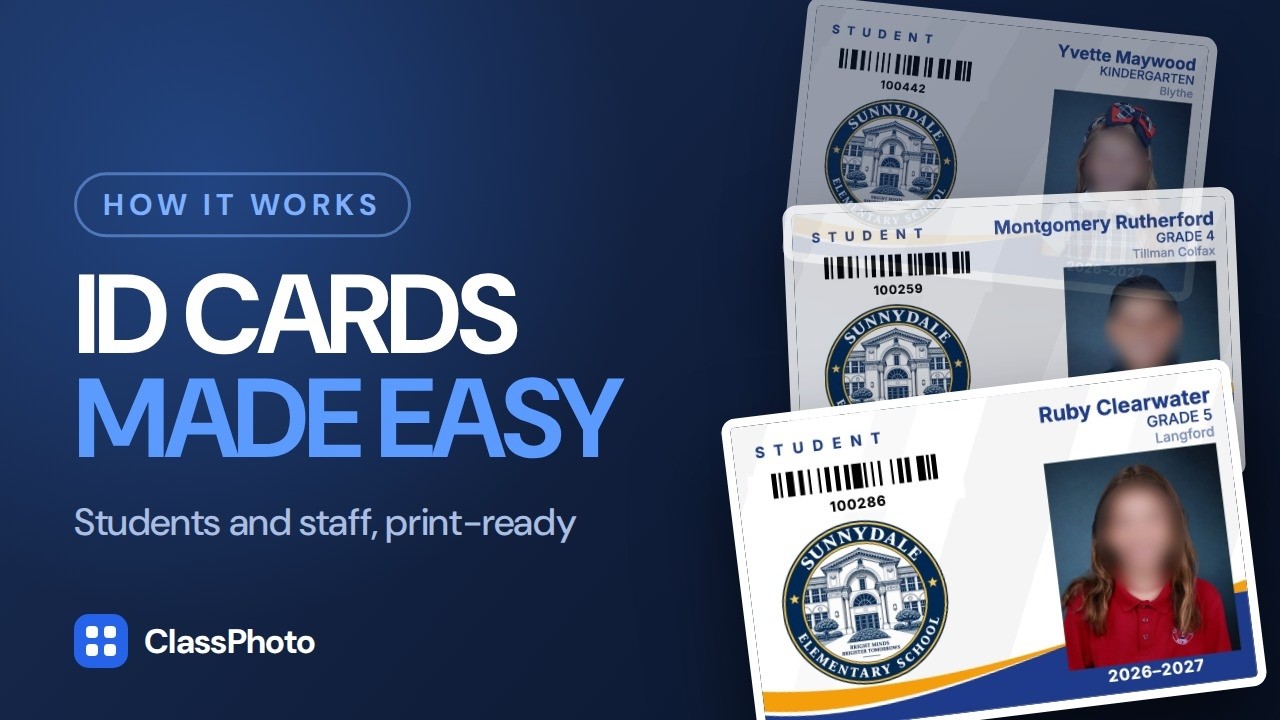
Yes, and it runs 3:50. Drop in the PSPA export, pick a card design, and every card builds with the photo, name, grade, teacher, school logo and a scannable barcode; the pre-flight checks every name fits, every photo is present and every barcode decodes before anything exports. You can watch it above, and the other walkthroughs are on the videos page.
Can I try it before I buy?
Yes. Open the app and choose Try the sample on the license screen. It loads a built-in sample school of 28 deliberately awkward students: long names, accents, apostrophes, leading-zero IDs, K/TK/PK/STAFF grades and one missing photo. Or drop in your own export. Exported cards carry a SAMPLE watermark until you enter a key.
Will the barcodes actually scan?
That is the part we spent the most time on. Every barcode is produced by one library, placed at whole device pixels at print resolution on a white plate with a quiet zone of at least ten modules, and then decoded again by a second, independent library. If the decode does not come back with the exact student ID, the export stops.
In the PDF the bars are drawn as vectors on top of the card, so they stay sharp at any print size. There is also a printable barcode test sheet you can run through your scanner before you commit the card stock.
What data does it read from my export?
Names, student IDs, grades, teachers and photo filenames. It reads every data file in the export: where two files describe the same students, the most complete one is used, and where a disc carries one PSPA index per class folder, all of them are read as a single roster, so a student only a class file lists is added, and anything two index files disagree about is flagged rather than quietly picked. The import report names the files it read and which column became which field, with a Change columns button if it got one wrong.
What can I print the cards on?
Either way round. Export a multipage print PDF with crop marks and optional bleed for a print shop or a sheet-fed printer, or individual PNG and JPG files at 300 or 600 DPI for a card printer that wants one file per card.
Does it do staff cards too?
Yes. Staff rows in the roster get cards like anyone else, with the card label and fields you choose.
I use GotPhoto on a Mac. Will this work?
Yes. ClassPhoto IDs runs in the browser, so it works on a Mac, a Windows PC or a Chromebook. It reads the GotPhoto export directly, including the Student_data.csv that carries the Identifier column your barcodes are made from. Read PSPA Index.txt explained if your export came from a lab instead.
More questions are answered in the main FAQ, or write to us and a real person will answer.
The rest of the Suite
ClassPhoto
$89/year
Class composites and full-school composites from your export.
ServiceStix
$49/year
Print-ready service sticker sheets, a whole school in minutes.
Principal's Book
$79/year
The bound whole-school directory the front office keeps on the counter.
List Fixer
$39/year
The school's messy roster spreadsheet, turned into one clean row per student for GotPhoto.
All five together: ClassPhoto Suite, $199/year introductory.
Also from our studio: Ruler, a separate Mac app that batch-crops a picture day so every face comes out the same size. It has its own license and is not part of the Suite.