The annoying part of picture day
happens after picture day.
You shot the school. You downloaded the export. ClassPhoto Suite turns that one export into the four things the school actually asks you for: class composites, service stickers, ID cards, and the principal's book (the mug book). And before any of that, List Fixer turns the roster the school sent into the clean list GotPhoto will actually import. Everything runs in your browser.
Start with the job in front of you. Each one opens the real app in sample mode, on your own export. No account.
- Class compositesClassPhoto
- Service stickersServiceStix
- Student ID cardsClassPhoto IDs
- The mug bookPrincipal's Book
- A clean GotPhoto names listList Fixer
Output is marked SAMPLE until you enter a key. ClassPhoto's sample builds your first two classes and List Fixer's downloads hold the first ten students; the other three run your whole school. Already licensed? These links open your app.
All five tools are $199 a year as the Suite. One tool on its own starts at $39.
- Photos never leave your computer
- Mac, Windows and Chromebook
- No account needed to try
Every fall, the part of school photography I dreaded most was the back end: composite class photos, service stickers and ID cards. Last year those took me days to sort out. This year, with ClassPhoto, the same jobs took less than an hour total. All 1500 ID cards came out print-ready, with names and info inside the safe area and no retyping. I made zero corrections and delivered to the school weeks sooner. Something that used to take up a whole week of my season is now the easy part.
Real output
Real files, not mockups.
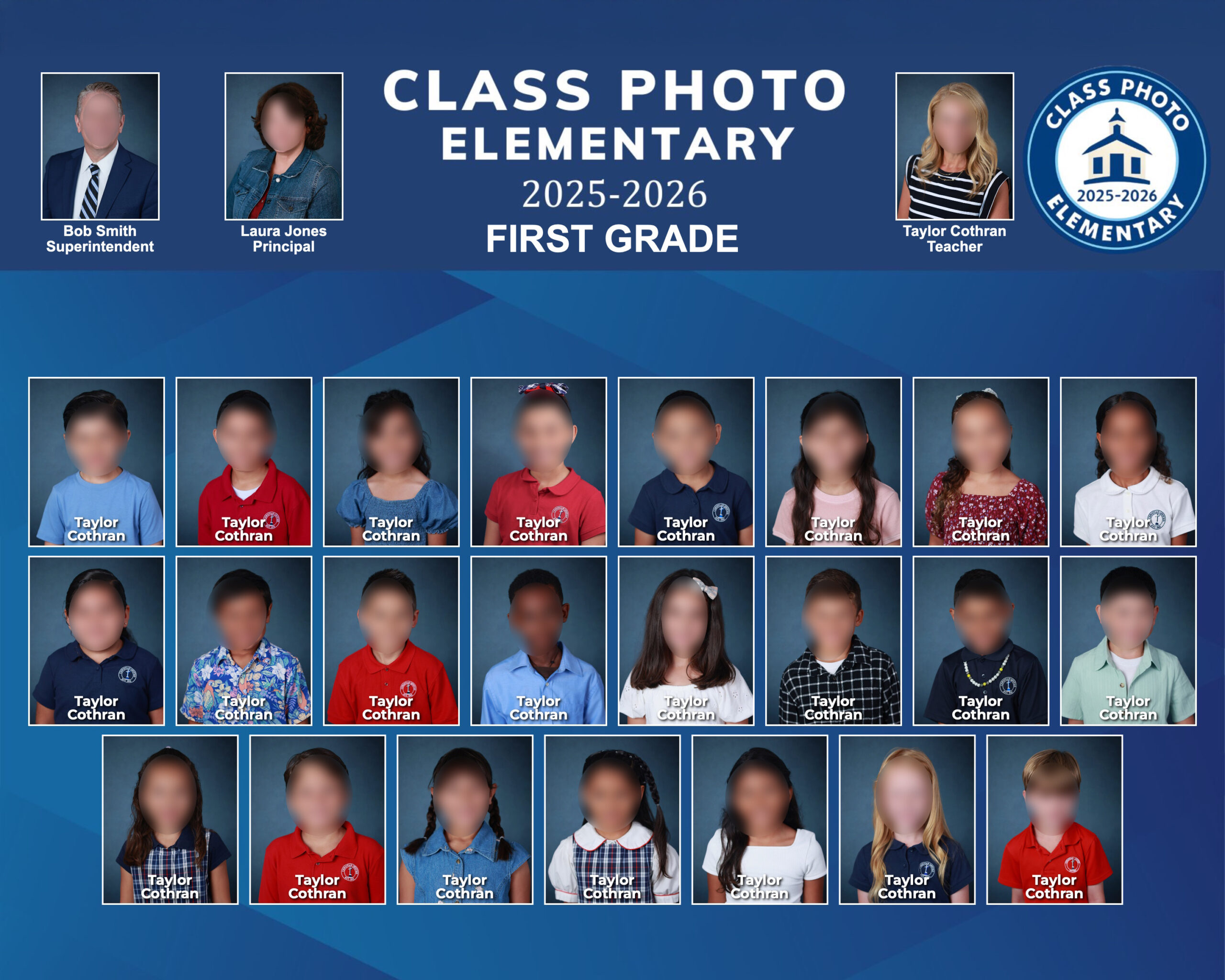
The video is the whole ClassPhoto workflow on a 25-class school, from the export going in to the print files coming out. Every screenshot on this site is the real app running on real sample data, including the ones with the trial watermark on them.
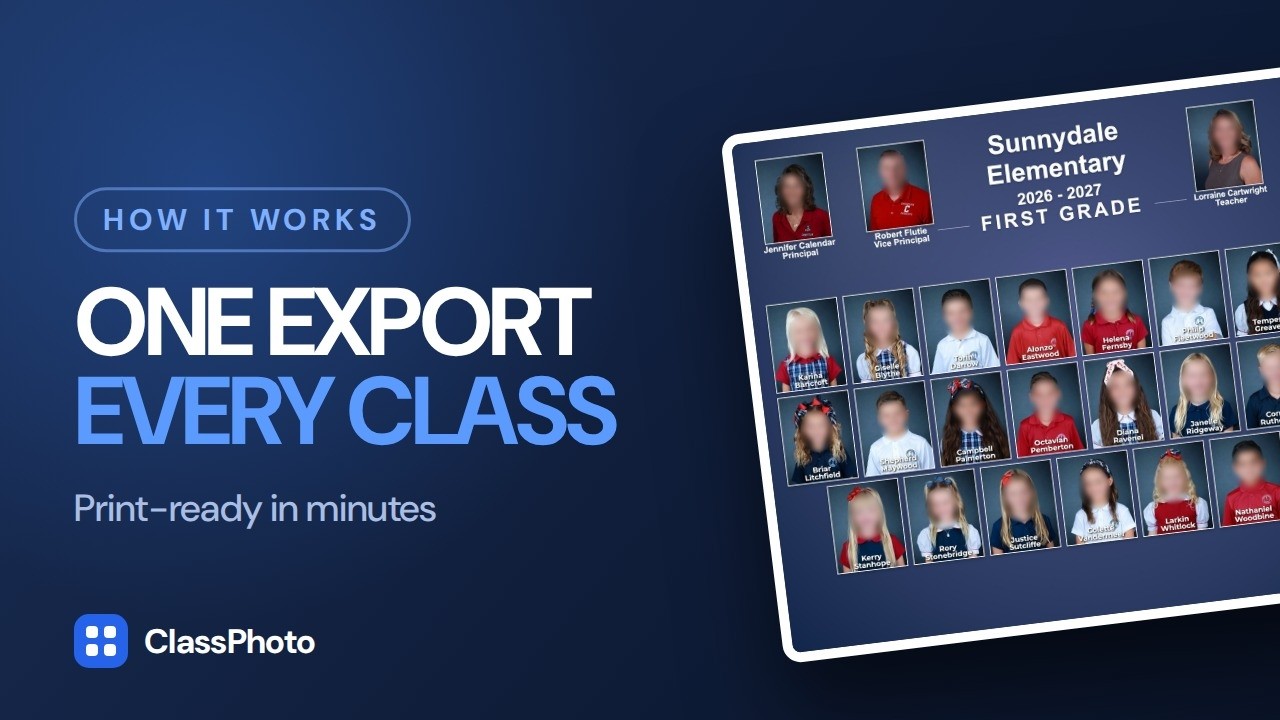

And one of the files it makes, straight out of the app:
The Suite
One school photo workflow. Five time-saving tools.
Four tools read the export you already download: a GotPhoto zip, a PSPA index and its images, or a folder of photos with a spreadsheet. List Fixer works one step earlier, cleaning up the roster the school sent before anything is exported. Buy one, or all five, in any order. The Suite also comes with School Packs, which turns the finished export into every folder the school asks for.
ClassPhoto
$89/year
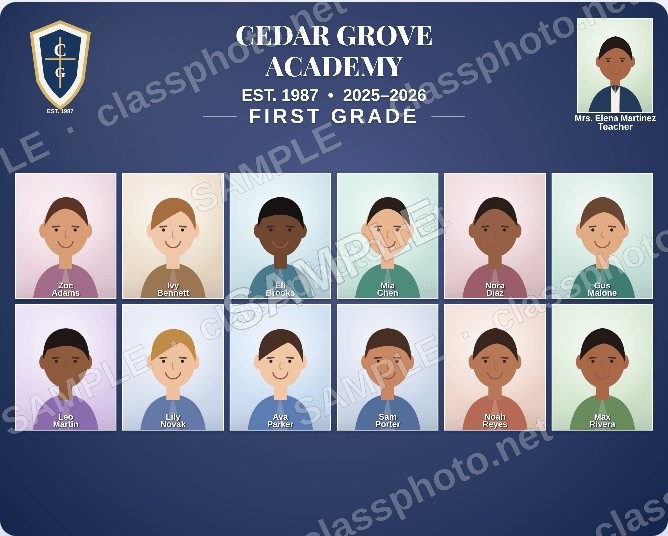
Class composites and full-school composites. Drop in the zip, pick a background, add the logo, and every class builds itself. A misspelled name or a late retake gets fixed on the finished layout instead of sending you back to re-import.
- Unlimited class composites
- Full school composite: every student on one page
- Custom or stock backgrounds, your logo, six header spots
- Print-ready JPEGs and PDF proofs for school approval
ServiceStix
$49/year
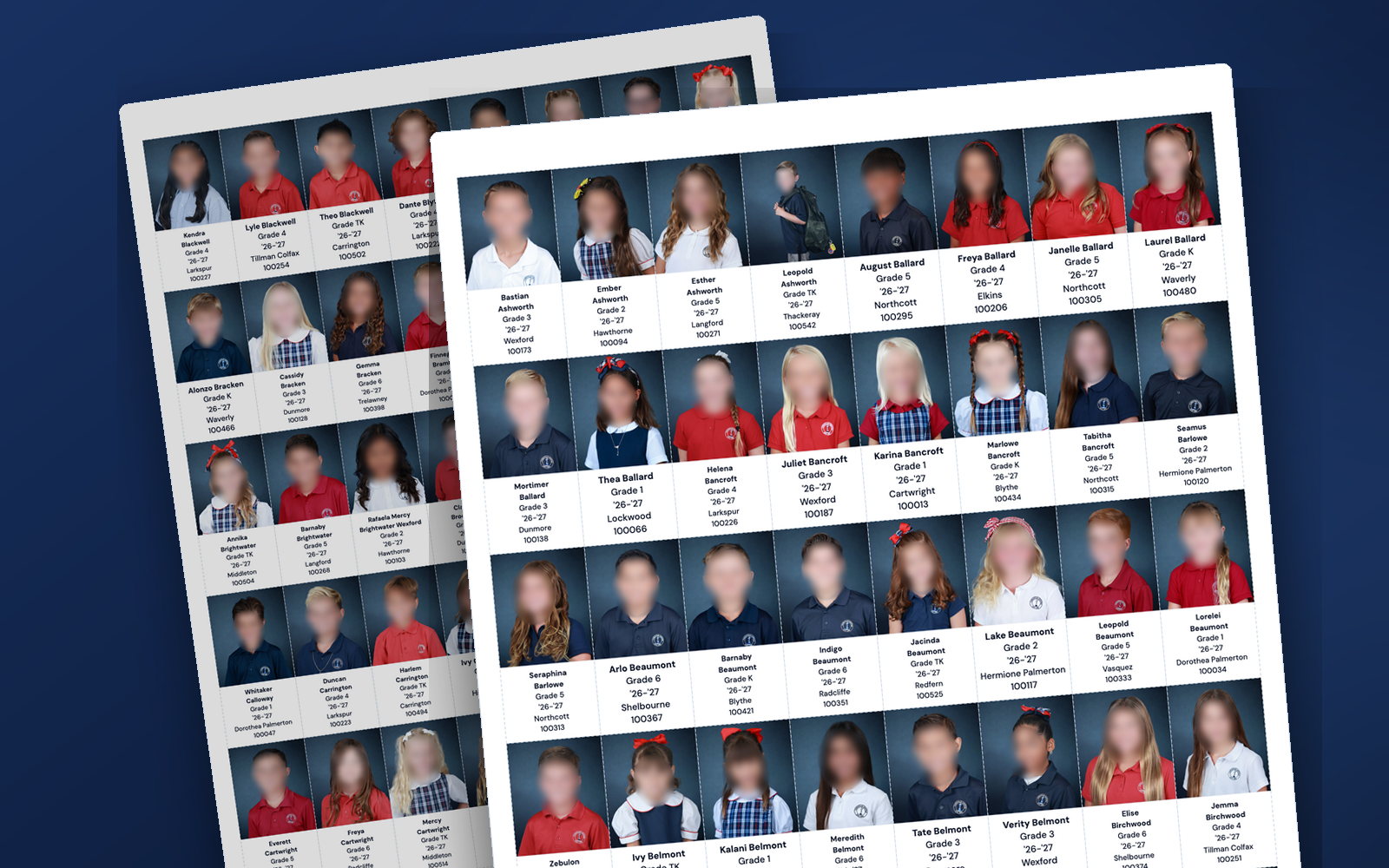
Print-ready service sticker sheets for the whole school: one sticker per student with photo, name, grade and teacher, sized to the Chromalabel, Avery, Labels by the Sheet or OfficeSmartLabels sheet the office already buys. Pick your fields once; every sheet previews before you print.
- Chromalabel, Avery, Labels by the Sheet and OfficeSmartLabels formats
- PSPA index file or GotPhoto folder import
- Every sheet previewed on screen before you print
- Sort by name, grade, or class
ClassPhoto IDs
$59/year
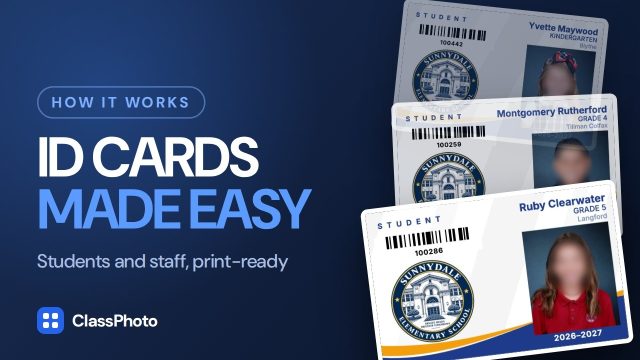
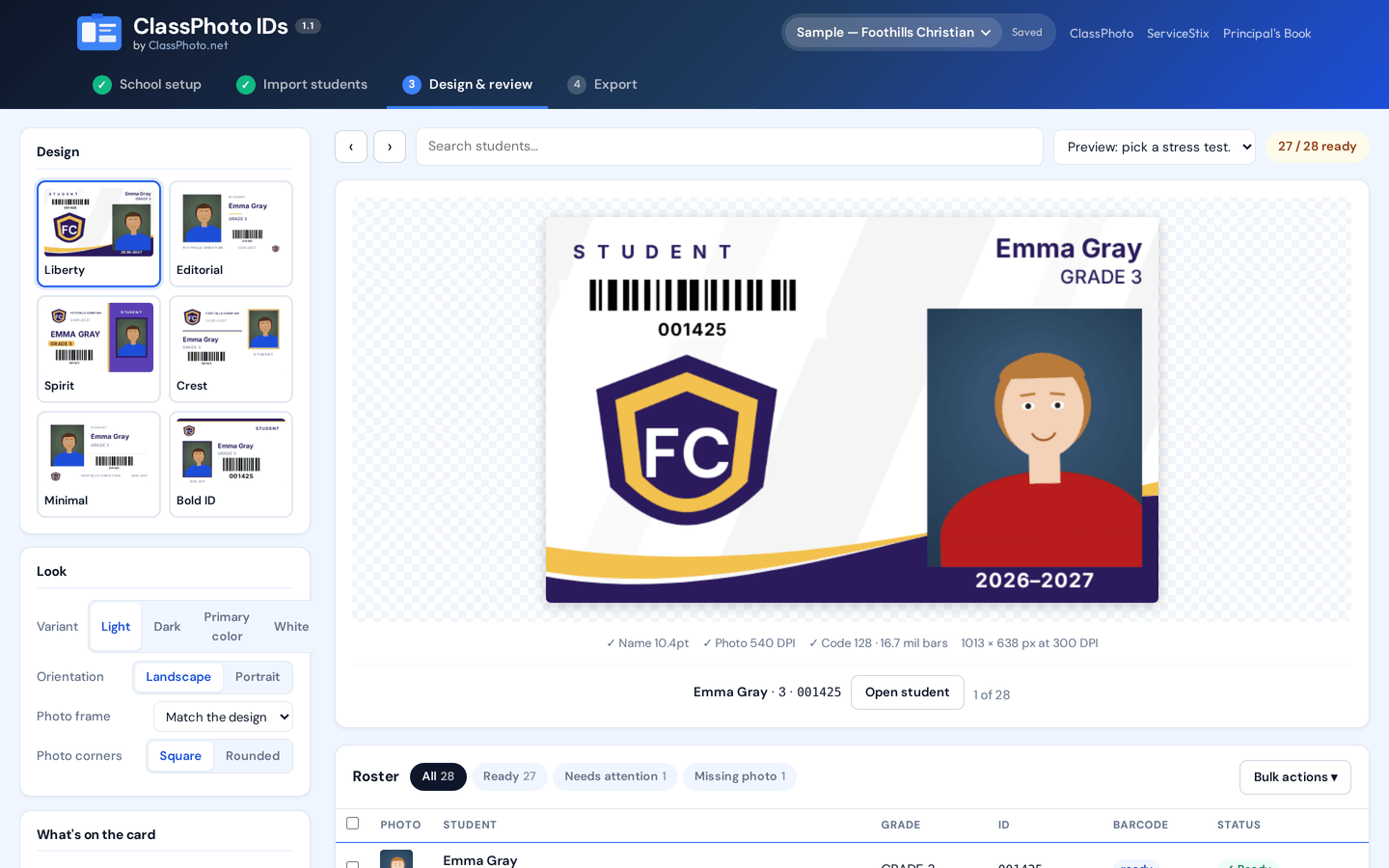
Create print-ready student and staff ID cards in your school's colors, complete with scannable barcodes, from the same export. Six card designs with your logo, true CR80 size, and every barcode, Code 128, Code 39 or QR, is decoded again by a second library before anything is allowed to export.
- Six card designs, landscape or portrait
- Barcodes verified by decoding, not by eye
- Face-aware crops, and names set on one line, never clipped or squeezed
- Print PDF with crop marks, or PNG and JPG
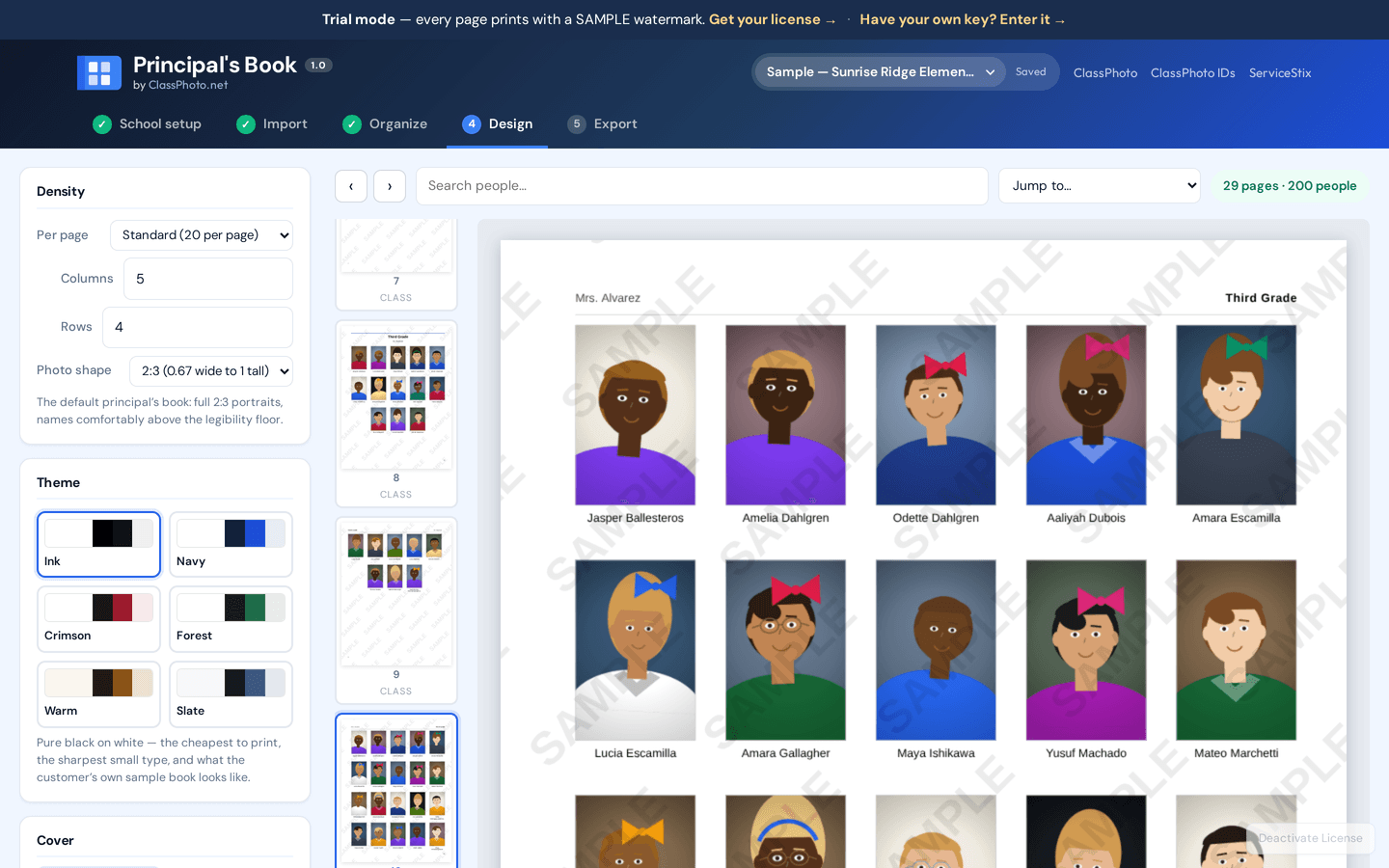
Principal's Book
$79/year
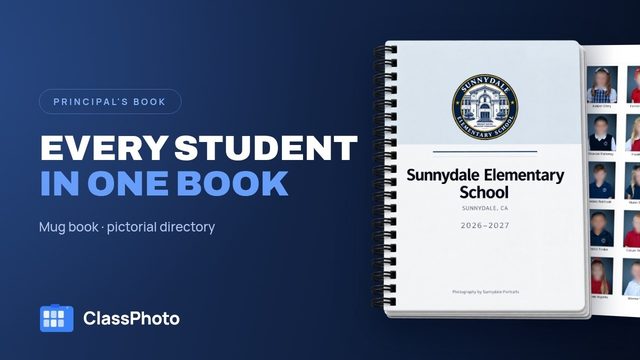
The mug book, also called a pictorial directory or the principal's book: the bound, print-ready whole-school directory the front office keeps on the counter. Cover, contents, class pages, staff, not pictured, and an index, assembled from the export in minutes.
- Letter, A4, half letter and more
- Coil, comb, saddle and perfect binding rules built in
- 300 dpi print PDF plus a proof PDF
- Nobody is ever silently left off a page
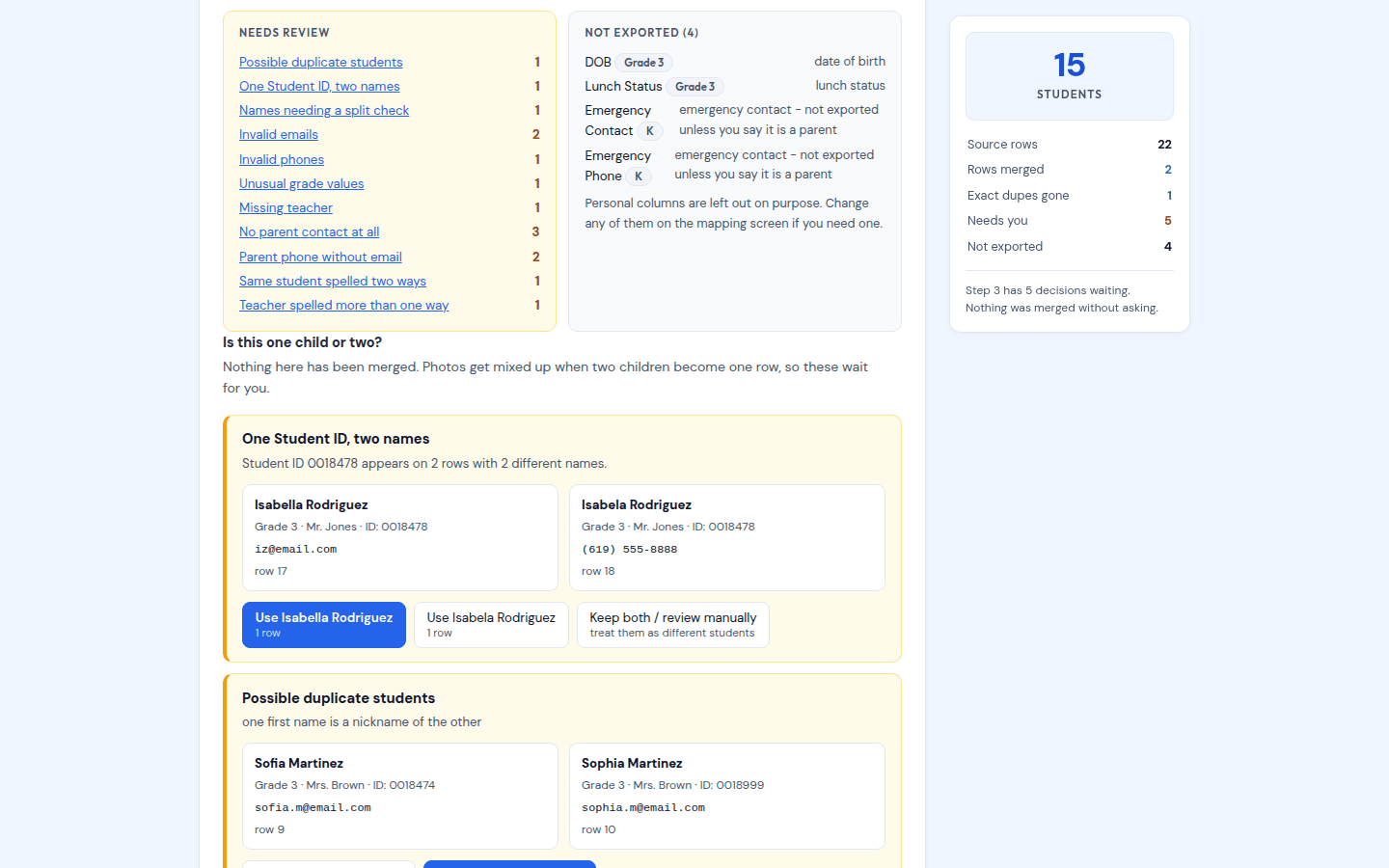
List Fixer
$39/year
The school sent a spreadsheet. GotPhoto wants one clean row per student. List Fixer reads whatever they sent, title rows, merged cells, one row per parent, and hands back a single-tab file with names split, grades normalized, student IDs keeping their zeros, and both parents on one row. Anything that might be two different children is handed to you to decide, never merged quietly. It also prints the Avery name labels we use to keep track of every child on picture day: here is how.
- Reads .xlsx, .xls and .csv, however messy
- Household rows merged, siblings kept separate
- Leading zeros survive, no apostrophe armour
- Avery 5160 name labels, one class per sheet
Westview Elementary/
  Teachers/
    Mrs. Johnson/   Emma Smith.jpg ...
  Yearbook/
    Index.txt   Emma Smith.jpg ...
  RenWeb/
104417.jpg 182 × 228, by School IDSchool Packs
Free with the Suite
After picture day the school wants the photos back in three or four different shapes. School Packs takes one GotPhoto export and writes every one of them: a folder per teacher, the yearbook set with its PSPA Index.txt, and the photos sized and named for the school's records system. It saves straight into the school's Google Drive folder, or a .zip, and makeup day merges right in.
- Teacher folders, full size, named First Last
- Yearbook set with a PSPA Index.txt
- RenWeb/FACTS and Synergy presets, or your own size and naming
- Parents' contact details in the export are never read
How it works
It starts where your export finishes.
Nothing changes about how you shoot, how you cull, or which lab you use. The Suite picks up the part nobody enjoys.
Shoot the school
Picture day, retakes, staff portraits. Same cameras, same lab, same everything you already do.
Your job, unchangedExport your data and photos
One GotPhoto zip, or a PSPA index with its images, or a folder plus a CSV. That single export feeds the four photo tools, so you download it once. If the school's roster arrived as a mess, List Fixer cleans it before it ever goes into GotPhoto.
One downloadLet the Suite do the tedious part
A clean roster, composites, sticker sheets, ID cards, the principal's book. Built in your browser, on the computer you already have.
A few minutes eachWhat the school asks for, and what makes it
"We need class pictures for every classroom."
ClassPhoto builds a composite per class, plus a full-school composite for the lobby.
"Can we get the service stickers again this year?"
ServiceStix lays out a whole school on the label sheets the office already buys.
"The kids need ID cards, and they have to scan."
ClassPhoto IDs prints CR80 cards with barcodes it decodes again before it lets you export.
"The office wants a book with everyone in it."
The Principal's Book is the bound directory, contents and index included.
"Here's our roster. Sorry, it's a bit of a mess."
List Fixer turns it into the one-row-per-student file GotPhoto imports, and flags the rows only a human can decide.
Features
True of every tool in the Suite.
Built by people who shoot school photography, for the week after picture day.
Runs in your browser
Mac, Windows, Chromebook. Nothing to install, nothing to update. Your license is checked when you open an app, at most once a day, and if that check cannot get through it keeps working for a week.
Student photos never leave your computer
Your zip is unpacked, laid out and exported on your own machine. The only thing any app sends is your license key. The Content Security Policy on the site makes that verifiable, not just a promise.
Reads the export you already have
GotPhoto zips, PSPA index files, CSV rosters, or plain folders of named photos. ServiceStix, IDs, Books and List Fixer read Excel rosters too, and IDs and Books read the student number out of the roster so barcodes and re-imports work.
Fix things in place
A misspelled name, a student who transferred out, a retake that came in late. You fix it on the layout you are looking at, not by renaming files and starting the class over.
Print-ready output
300 dpi PDFs, high-res JPEGs and PNGs, crop marks and bleed where the printer needs them. Sized for the lab and the label sheet, not for a screen.
Live preview before you commit
A real page, card or sticker renders as you change settings, using the same engine that makes the final file. What you see is what prints.
Your work stays on your computer
ClassPhoto autosaves your session as you go and says so if a save fails. ClassPhoto IDs and the Principal's Book keep projects in your browser between sessions. Nothing is stored on a server.
Save the school for next year
ClassPhoto IDs saves a brand profile and the Principal's Book a school profile: colors, logo, fonts and book settings. Next September you load the school and drop in the new export.
An import report that names what's wrong
Children on the roster with no photo, photos in a format the browser cannot open, and photos the roster does not know are named on screen before anything is built, instead of being discovered by the school.
A real person answers
Support comes from the people who wrote the software and shoot school photography with it. Two business days, usually much less.
ServiceStix
Service stickers from the export you already have.
Schools order photo service stickers every year: a sticker per student with their photo, name, grade, and teacher. ServiceStix turns the export you already downloaded into print-ready sticker sheets, a whole school in minutes.
Drop in the same ZIP
PSPA and yearbook exports with an index file, GotPhoto's grade and teacher folder structure, or plain named files. Student data fills in automatically.
Pick your sticker fields
Name, grade, teacher, school year, student ID. Toggle and reorder them, watch the live sticker preview update, and choose your sort order.
Preview and print
Review every sheet on screen, then download one print-ready PDF sized exactly for Chromalabel, Avery, Labels by the Sheet or OfficeSmartLabels label sheets.
Compare
ClassPhoto and QComposite, side by side.
Composites are where most photographers start. Other tools make you fight the software. ClassPhoto lets you fix mistakes, swap photos, and edit names without starting over.
| Feature |
ClassPhoto
$89/yr
|
QComposite
$149/yr
|
|---|---|---|
| Editing & corrections | ||
| Edit names directly in your layout | Yes | NoNames pulled from filenames |
| Remove or update students instantly | Yes | ManualRe-import required |
| Swap photos without re-importing | Yes | No |
| Fix teacher names anytime | Yes | ManualRename file & re-import |
| Built-in alerts for multi-part names | Yes | No |
| No restarting over small mistakes | Yes | Often required |
| Output & delivery | ||
| Auto-generate PDF proofs for schools | Yes | No |
| Export high-res JPEGs (print-ready) | Yes | Yes |
| Batch generation (all classes at once) | Yes | Yes |
| Setup & workflow | ||
| Import from GotPhoto zip | Yes | Yes |
| Custom & stock backgrounds | Yes | Custom only |
| Multiple print sizes | Yes | No |
| Full school composite (every student on one page) | Yes | No |
| Web-based (no install needed) | Yes | Desktop app |
| Layout creation | SmartAuto-arranges rows to fit the page based on student count | YesFull layer editor |
| Pricing | ||
| Annual price | $89 | $149 |
| Unlimited composites | Yes | Yes |
Want the long version? Read the full ClassPhoto vs QComposite comparison.
Pricing
Buy one tool, or buy the set.
No per-school fees. No per-composite limits. Annual subscriptions, billed once a year, cancel any time.
ClassPhoto
$89/yr
Billed annually. Instant access.
Buy ClassPhoto- Unlimited class composites
- Full school composites, any size school
- Custom & stock backgrounds
- PDF proofs and high-res JPEGs
- Use on 2 computers
ServiceStix
$49/yr
Billed annually. Instant access.
Buy ServiceStix- Unlimited sticker sheets
- Four label sheet formats
- PSPA and GotPhoto import
- On-screen sheet preview
- Use on 5 computers
ClassPhoto IDs
$59/yr
Billed annually. Instant access.
Buy ClassPhoto IDs- Unlimited ID cards
- Six card designs, CR80
- Verified Code 128, Code 39 and QR
- Print PDF, PNG or JPG
- Barcode test sheet
Principal's Book
$79/yr
Billed annually. Instant access.
Buy the Principal's Book- Unlimited books
- Every page size and binding
- Contents, index and Not Pictured
- 300 dpi print PDF
- Proof PDF for the school
List Fixer
$39/yr
Billed annually. Instant access.
Buy List Fixer- Any roster: .xlsx, .xls, .csv
- One clean row per student
- Households merged, siblings kept apart
- Leading zeros survive
- Avery 5160 name labels
ClassPhoto Suite
All five tools on one license key with one renewal date, so you stop tracking which product expires in March. Tools we add to the Suite later are included at no extra cost.
- ClassPhoto
- ServiceStix
- ClassPhoto IDs
- Principal's Book
- List Fixer
- Bonus: School Packs, free with the Suite
- Every future Suite tool
- Email support from the people who made it, usually within two business days
| ClassPhoto | $89 |
| ServiceStix | $49 |
| ClassPhoto IDs | $59 |
| Principal's Book | $79 |
| List Fixer | $39 |
| Bought separately | $315/yr |
$199/yr
Introductory price. Regular price $229/year.
Save $116 a year
Get the SuiteClassPhoto on its own is $89 a year.
Looking for Ruler, our Mac app that batch-crops a picture day? It is a separate product with its own license, sold at cropruler.com, and it is not part of the Suite key.
Hand off the busywork.
Pick the tool that fixes the job in front of you, or take all five and stop thinking about it.
Get the Suite, $199/yearSupport & FAQ
Questions? We've got answers.
Most questions are answered below. Please check the FAQ first, it covers almost everything that comes up.
Before you buy
What is the ClassPhoto Suite?
Five tools that all read the same photo export, sold together for one price. ClassPhoto makes class composites, ServiceStix makes service sticker sheets, ClassPhoto IDs makes student and staff ID cards, the Principal's Book makes the bound school directory, and List Fixer turns the roster the school sent into a clean GotPhoto import.
Bought one at a time they add up to $315 a year. The Suite is $199 a year at the introductory price, on one key with one renewal date. Tools we add to the Suite later are included.
The Suite also comes with a bonus, at no extra charge: School Packs. Drop in one GotPhoto export and it builds every folder the school asks for: a folder of photos per teacher, the yearbook set with its PSPA Index.txt, and the photos sized and named for the school's records system, such as RenWeb/FACTS or Synergy. It saves them straight into a folder, like the school's Google Drive, or as a .zip, and the photos never leave your computer. School Packs comes only with the Suite and is not sold on its own, but you can try it free for 30 days.
Which tool should I start with?
Whichever job is in front of you. Most photographers start with ClassPhoto, because composites are what every school asks for first. ServiceStix is the cheapest way to stop dreading the sticker order. ClassPhoto IDs and the Principal's Book are the two that let you quote a school something nobody else in your market is offering.
If you already know you want four of them, the Suite costs less than any four bought separately. It also costs less than ClassPhoto and the Principal's Book plus any third tool.
Do I have to buy all five?
No. Every tool works on its own and none of them needs the others. Buy the one that solves the job in front of you. If you already own ClassPhoto or ServiceStix and later move to the Suite, contact us before you buy so we can credit what you have already paid.
What is ServiceStix? Do I need ClassPhoto to use it?
ServiceStix is our second tool: it turns the same photo export into print-ready service sticker sheets: one sticker per student with their photo, name, grade, and teacher, laid out for standard label sheets you can buy on Amazon.
It's sold separately ($49/year) and works completely on its own, so you don't need a ClassPhoto license. It is one of five tools built around the same picture-day job: four of them read the export you already download, ClassPhoto for composites, ServiceStix for stickers, ClassPhoto IDs for ID cards and the Principal's Book for the school directory, and List Fixer cleans the roster before it. All five together are $199/year as the ClassPhoto Suite.
What is List Fixer? Do I need it?
List Fixer is for the step before GotPhoto. Schools send rosters as whatever their student information system spits out: a title row, a logo, merged cells, one row per parent, student IDs that lost their leading zeros somewhere. GotPhoto wants one clean row per student. List Fixer reads the file the school sent, fixes the formatting on its own, and shows you side by side the handful of rows only a human can decide, like the same name under two teachers, or Sofia next to Sophia. It never silently merges two children.
If your schools already send clean spreadsheets, you can skip it. If you have ever spent an evening in Excel before picture day, it pays for itself on the first school. It is $39 a year on its own, and included in the Suite.
Why does List Fixer print Avery labels?
Because that is how we keep track of every child on picture day, after years of learning that asking a five-year-old to say and spell an unusual name in a moving line does not work. List Fixer prints one Avery 5160 name label per student, one class per sheet, from the roster you just cleaned. The sheet goes to the camera with the class and the teacher puts each child's label on their hand as they arrive. At the camera we read the name off the sticker and tap it in Entagged on the phone, so the name in the photo's metadata is spelled the way the school spelled it. Whatever is still on the sheet when the class leaves is the absent list. We do this instead of shooting QR codes. The whole method, in one short post.
What is Ruler? Is it part of the Suite?
Ruler is a separate app from our studio, for the step before any of this: cropping. It is a Mac app that batch-crops a whole picture day and sizes every crop from the child's face, eyes to chin, so every portrait comes out with the same size face and the same headroom, and a bow, big hair or a lean never changes it. Every face is found on your own Mac, and no photo is uploaded.
It is not part of the ClassPhoto Suite. Ruler has its own name, its own site and its own license: $199 a year for one photographer on two Macs, after a three-day free trial of the whole app. It needs macOS 14 or newer. A Suite key does not open Ruler, a Ruler key does not open the Suite, and you do not need one to use the other. The crops Ruler exports keep your folders as they were, so they feed all five Suite tools the same as any other photos. The trial download and the checkout are both at cropruler.com.
Does ClassPhoto work on Mac?
Yes. ClassPhoto runs entirely in your web browser, so it works on Mac, Windows, Chromebook, or any other computer. There's nothing to download or install. Open the page, enter your license key once, and go.
What are the system requirements?
You'll need:
- A modern web browser: Chrome, Edge, Firefox, or Safari (the latest version is best)
- A reliable internet connection
- Enough free disk space to download your finished composites
That's it. No special graphics card, no minimum RAM, no installer. If you can browse the web, you can run ClassPhoto.
Do I have to use GotPhoto? Can I use my own files?
ClassPhoto is built around the zip GotPhoto exports, so it works with GotPhoto out of the box, but it reads a lot more than that. It also reads PSPA and yearbook discs with an INDEX.TXT or MASTER.TXT, including the Captura Workflow and Picaboo layouts, where the photo filenames don't matter; PhotoDay 'Service Item' exports with their Index.csv; a CSV or XLSX roster next to your photos; and plain class folders from Proofpix and most other systems (nested grade to teacher folders are fine).
Not sure? Use the contact form at the bottom of this page to send us a sample of your export file structure and we'll take a look before you buy.
Is ClassPhoto a good QComposite alternative?
Many school photographers come to ClassPhoto looking for a QComposite alternative. ClassPhoto is $89/year instead of $149/year, runs in your browser on Mac, Windows, or Chromebook, and lets you edit student names, swap photos, and fix mistakes right in the layout instead of re-importing. See the full feature comparison above. Want the whole picture? Read our full ClassPhoto vs QComposite comparison.
Does ClassPhoto work with PhotoDay or other volume photography platforms?
Yes. PhotoDay's photos arrive loose rather than in class folders, so export as 'Service Item' with the .csv data file (Group Subjects By: Grade) and ClassPhoto reads the Index.csv to sort everyone into classes. Other platforms work the same way: a PSPA or yearbook index file (INDEX.TXT / MASTER.TXT, Captura Workflow and Picaboo layouts included), a CSV or XLSX roster, or plain folders by class. Send us a sample export through the contact form below if yours is unusual and we'll confirm before you buy.
What's your refund policy?
ClassPhoto is a digital product with instant access, so all sales are final. We keep it affordable at $89 a year and put everything you need to evaluate it right on this page: the feature list, the comparison with other tools, and a real sample composite generated by the app.
That said, if something is genuinely broken (the app won't load, your license key never arrived, the software isn't working as described), reach out through the contact form below and we'll make it right. Payments are processed by Lemon Squeezy, who acts as our merchant of record.
How does the subscription work?
ClassPhoto is $89 per year. Your subscription renews automatically on the anniversary of your purchase so your access never lapses. You'll get an email receipt from Lemon Squeezy each time you're billed, and you can cancel at any time. No phone calls, no guilt trips.
Is my data safe? Are student photos uploaded somewhere?
No. Every tool in the Suite runs entirely inside your browser. Your zip is unpacked on your computer, the pages are drawn on your computer, and the finished files save to your computer. Nothing is uploaded, and there is no account and no server holding student photos.
The one thing the app does send is your license key, to Lemon Squeezy, to check that it is valid. The app is served with a Content Security Policy that only permits that one connection, so a school IT director can verify the claim from the response headers rather than taking our word for it.
If a school client needs this in writing, use the contact form below and we will send you something you can forward.
There is a page you can forward to a school's IT department: Privacy for schools.
Can I see what it looks like before I buy?
Yes, and you can do better than look: every tool has a free sample mode. Open any app from the links near the top of this page, choose Try the sample on the license screen, and run it on your own export. Output carries a SAMPLE watermark until you enter a key.
Scroll up to the "Real output" section of this page. That's an actual composite generated by ClassPhoto, not a marketing mockup, and the 3:28 video above it is the whole workflow on a sample school. There are also short video walkthroughs of ClassPhoto, ServiceStix, ClassPhoto IDs and the Principal's Book on the videos page. The feature list and comparison chart cover exactly what the app does and doesn't do, so you can evaluate it against what you currently use.
If you have a specific question about your workflow before buying, use the contact form at the bottom of this page and we'll answer it honestly.
How do I pay? What payment methods do you accept?
Checkout is handled by Lemon Squeezy, which accepts all major credit and debit cards, plus Apple Pay, Google Pay, and PayPal in most regions. You'll get a receipt by email the moment your payment clears, with your license key included.
Once you're using ClassPhoto
I lost my license key. How do I find it again?
You have a few ways to get it back:
- Check your email. Search your inbox for "Lemon Squeezy" or "ClassPhoto". Your license key was sent in your original receipt.
- Log into your Lemon Squeezy customer account. Go to app.lemonsqueezy.com/my-orders, enter the email address you used at checkout, and they'll send you a secure magic link. Your license key is on the order page.
- Contact us. If neither of those works, use the contact form at the bottom of this page (use the email address you purchased with) and we'll look it up for you.
How do I import my GotPhoto zip file?
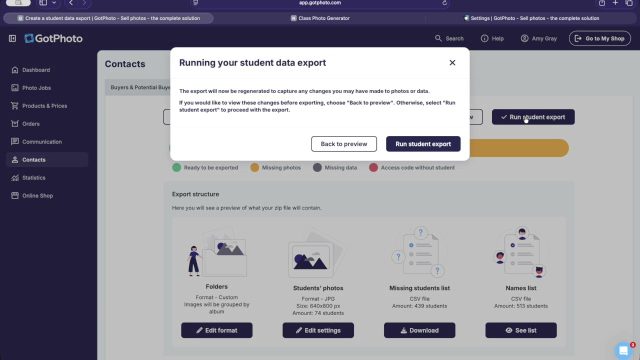
Inside the app, click the upload area (or drag your zip file onto it) and select the export file you downloaded from GotPhoto. ClassPhoto sorts every student into the correct class, from the class folders, or from the index's teacher and home-room columns when the export carries one. If the zip has an index file or roster CSV (GotPhoto's PSPA Index.txt or Student_data.csv), the names, grades and teachers come straight from there, spelled the way the school spells them; if it doesn't, ClassPhoto reads the names from the file names. If you are not sure how to get the zip out of GotPhoto, the 2:40 export tutorial shows it.
Don't unzip the file first. Upload it as a .zip. ClassPhoto handles the unpacking.
If you already unzipped it to take a peek, here's how to zip it back up:
On a Mac:
- Find the folder that was inside the zip (the one containing all your class subfolders)
- Right-click (or Control-click) the folder and choose Compress "[folder name]"
- Mac creates a fresh
.zipfile right next to the folder. Upload that one
On Windows:
- Find the folder that was inside the zip
- Right-click the folder and choose Send to → Compressed (zipped) folder (on Windows 11 you may see Compress to → ZIP file)
- Windows creates a new
.zipfile. Upload that one
Zip the folder itself, not a selection of files inside it. ClassPhoto needs to see the class folder structure exactly the way GotPhoto exported it.
My composite won't generate or export. What do I do?
Most export issues come down to one of these:
- Your browser tab went to sleep. Large batches take processing power. Keep the ClassPhoto tab active and your computer awake while composites are generating.
- Your zip file is incomplete or corrupted. Try re-downloading the export from GotPhoto and uploading the fresh file.
- The download didn't start. Use the buttons on the finish screen: they hand you the package, the PDF or the JPEGs again from a click, which no browser blocks.
- Storage full. Make sure your computer has enough free space to hold the downloaded files.
If none of those fix it, use the contact form below and describe what you're seeing: what step you were on, what the error message said (if any), and what browser you're using. We'll help you sort it out.
A student's name is wrong. How do I fix it?
Open the class, click into the student's name, and type the fix. No need to rename files, re-import, or start the class over. The composite updates with the corrected name.
This is one of the biggest differences between ClassPhoto and other composite tools: you fix the mistake where you see it, not by digging through folders.
How do I add, remove, or swap a student?
Open the class you want to edit, then:
- To remove a student: click Remove next to their photo. The layout re-flows automatically, and there's an Undo if you change your mind.
- To add a student: upload their photo from your computer and assign them to the class.
- To swap a student's photo: click Replace photo on the student and choose the new file. Their name and spot stay put, which is what you want when you drop in a re-edited image.
What size and format should my background and logo be?
Backgrounds: JPG or PNG, at least 3000 pixels wide for print-quality results. Horizontal orientation works best.
Logos: PNG with a transparent background so your logo sits cleanly over the composite. At least 800 pixels on the longest side.
If your files don't quite meet those specs, ClassPhoto will still use them. The composite just won't look as crisp when printed large.
Can I use ClassPhoto on more than one computer?
Yes. A ClassPhoto key activates on 2 computers and a ServiceStix key on 5, which covers a studio desktop and a laptop with room to spare. If you hit the limit because you replaced a machine, use the contact form below and we will free up the slot.
Can I generate PDF proofs for the school to review?
Yes. Once you've built your composites, you can export the whole batch as PDF proofs in one click, ready to email to the school admin or teacher for name-check and approval before you print.
Where do my finished composites save?
Everything lands in your computer's default Downloads folder as a single zip named for the school and year, ClassComposite_Lincoln_Elementary_2026.zip. Inside it you'll find the print-ready PDF plus a JPEGs folder holding a high-resolution JPEG for every page. The finish screen can also hand you the PDF on its own or the JPEGs on their own, and you can re-export a single class as one JPEG any time. From there you can upload them to your lab, email them to the school, or organize them however you like.
How do I cancel my subscription?
You can cancel anytime directly through Lemon Squeezy:
- Go to app.lemonsqueezy.com/my-orders
- Enter your purchase email to get a magic login link
- Open your ClassPhoto subscription and click Cancel
Your access stays active until the end of your current billing period, then your license key will stop working. There are no partial-year refunds, but you're welcome to keep using it until your year runs out.
If you run into any trouble canceling, reach out through the contact form below.
My subscription renewed and I forgot to cancel. Can I get a refund?
Reach out through the contact form below as soon as you notice. We can't guarantee a refund on renewals, but if it just happened and you haven't used ClassPhoto since the renewal, we'll take a look at your situation. We're not trying to keep money from people who genuinely don't want the product anymore.
To avoid this in the future, you can cancel your subscription any time at app.lemonsqueezy.com/my-orders and keep your access through the end of your current billing period.
Will my work be lost if my subscription expires?
No. The final JPEG and PDF files you've already downloaded are yours to keep forever. They live on your computer. If your subscription lapses, you lose access to the app (so you can't generate new composites until you renew), but nothing you've already created goes anywhere.
I just need to talk to a real person.
Totally fair. Use the contact form right below this FAQ to tell us what's going on, even if it's something we haven't covered above, and a real human will get back to you within two business days. The more detail you can give us (what step you were on, what you expected to happen, what actually happened), the faster we can help.
Still stuck? Contact us.
Fill out the form below and a real human will get back to you within two business days (Monday–Friday, Pacific Time).
Thanks, we got it.
We'll get back to you within two business days. Keep an eye on your inbox (and your spam folder, just in case).