List Fixer · $39 a year
The roster the school sent,
the way GotPhoto wants it.
Drop in whatever spreadsheet the school sent: title rows, a logo, merged cells, one row per parent, student IDs that lost their zeros. List Fixer hands back a single-tab file with one clean row per student, ready to upload as a GotPhoto names list, and a stack of Avery name labels for every class. Formatting problems get fixed on their own. Two rows that might be two different children are never merged on their own: the app puts them side by side and you decide.
Billed annually. Instant access. Runs in your browser; the roster never leaves your computer. Free sample mode shows your whole roster on screen; downloads hold the first ten students and are marked SAMPLE.
Want to try one first? Every ClassPhoto tool includes a free sample mode. No account needed.
Sample output carries a SAMPLE watermark. Already licensed? The same links open your app.
What it does
One rule: fix the formatting, ask about the identity.
Every school's student information system names things differently and exports them badly. StuFirst, HR Teacher, PermID, MomCell. A report title above the header, a totals row under it, the header repeated halfway down because somebody printed it. List Fixer finds the real header row, works out what every column means, and shows you its guesses before it touches anything, so the one thing that varies wildly between schools is the one thing you check.
Formatting gets fixed without asking. Smith, Emma becomes Emma and Smith.
Kindergarten, Kinder and KG all become K. (619) 555-1234 and
619-555-1234 are one phone number. MOM@GMAIL.COM is mom@gmail.com. Two
emails typed into one cell become Parent 1 and Parent 2. Smart quotes, non-breaking spaces and the invisible
characters a spreadsheet smuggles in are scrubbed on the way through.
Identity gets handed to you. Schools export one row per parent, so a child in two households
arrives twice, and that is one student with two buyers, not two students. Rows that share a valid student ID, or
that match on first name, last name, grade and teacher, are merged and reported. Rows that are almost the
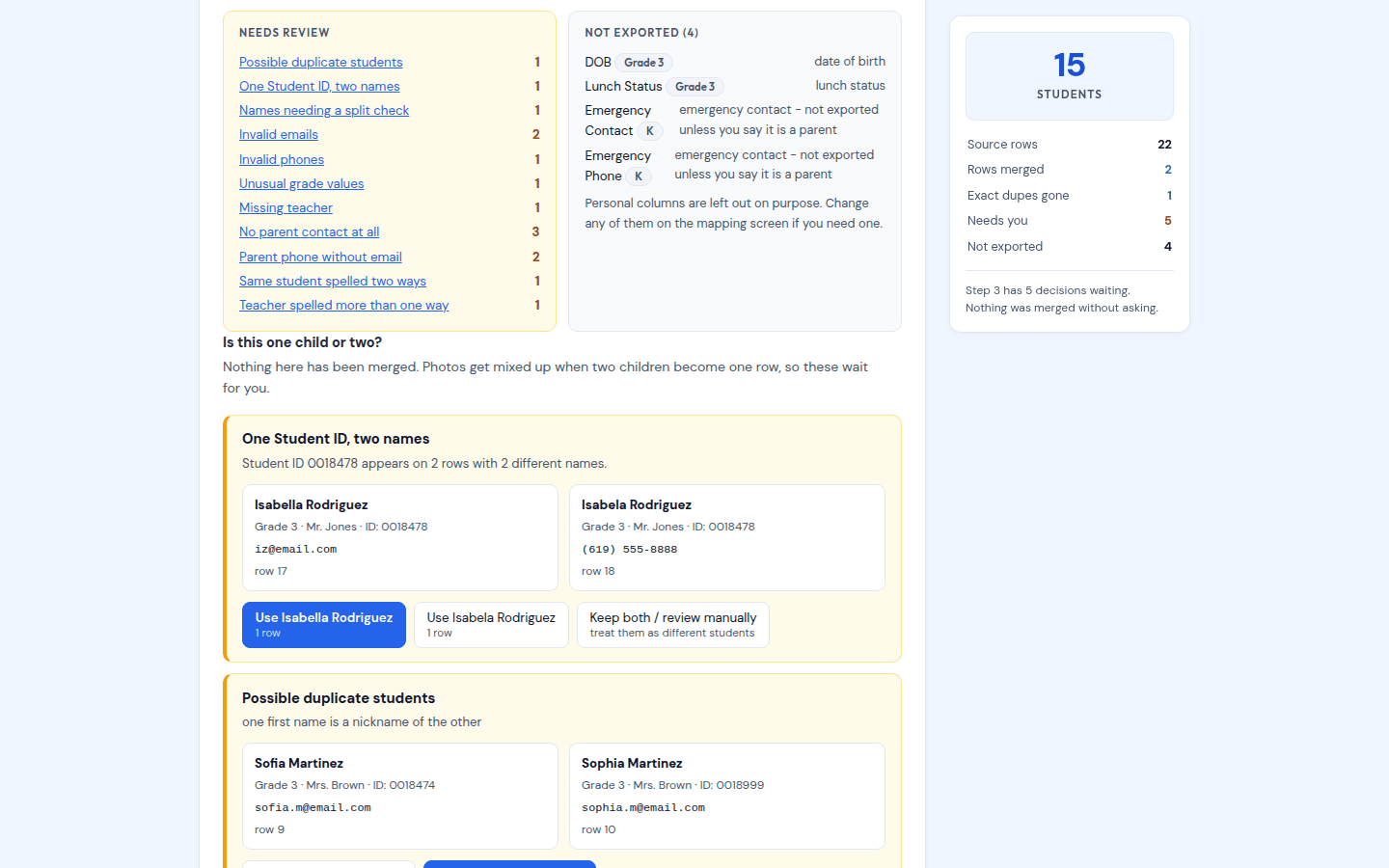
same, the same name under two different teachers, Sofia next to Sophia, one ID carrying
two spellings, become a card with the two records side by side and buttons like Merge as same
student and Keep as two students. Same last name is never treated as evidence, so
siblings stay separate. Nothing is merged quietly, and no parent's contact details are ever thrown away.
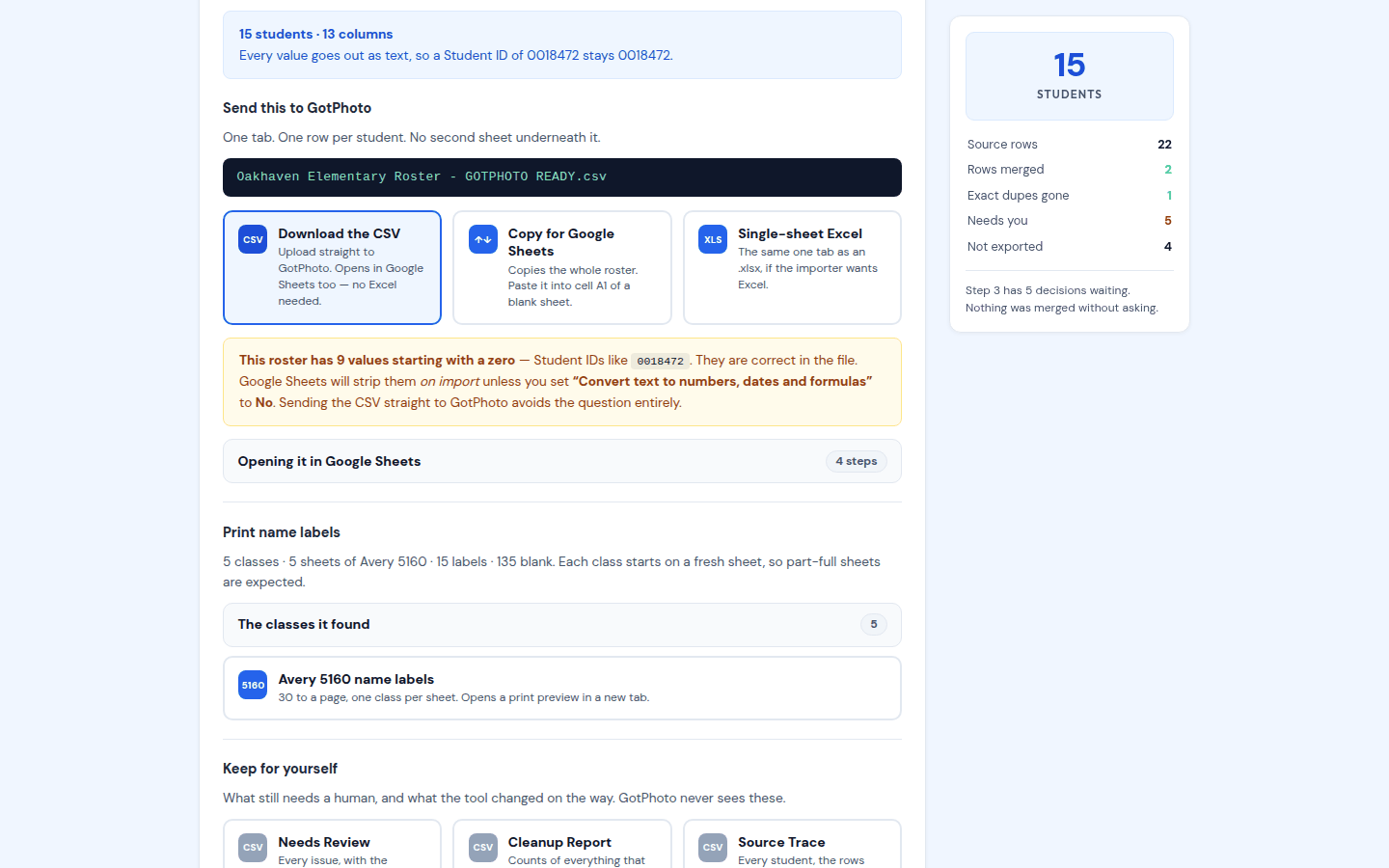
Leading zeros survive. A student ID of 0018472 comes out of the CSV as
0018472, as plain text, with no apostrophe and no ="..." wrapper, because GotPhoto reads
the file directly and either of those would arrive as part of the data. The app counts the values at risk and warns
you before you open the file in a spreadsheet that would strip them.
The workflow
Upload, check the columns, decide a handful, download.
Everything runs in your browser, on the computer you already have. The file you drop in is never modified.
Upload
.xlsx, .xls, .csv, .tsv, or a .txt with tabs or semicolons between the columns. Title rows, logos, blank rows, repeated headers, footer totals, merged cells, hidden rows, formulas and multiple tabs are all expected.
Check the columns
Every tab it found, which one looks like a roster, which row it believes is the header, and what it thinks each column means. Change anything that is wrong before it processes.
Fix and review
A dashboard of what was fixed automatically and which columns are being left out, then the questions: each one a card with the two records side by side.
Download
The GotPhoto-ready roster as a single-tab CSV or Excel file, a one-click copy for Google Sheets, the name labels, and a review file and cleanup report for your records.
Features
What List Fixer does.
Built around the evening in Excel that used to come before every picture day.
Reads what the school sent
Excel or CSV, any tab, any header row, any column names. It finds the roster inside the workbook and tells you what it found.
Column mapping you can see
StuFirst becomes Student First Name, PermID becomes Student ID, DadCell becomes Parent Cell 2. Every guess is shown and every guess can be changed.
Households merged, siblings kept apart
One row per parent becomes one row per child with every parent's contact kept. Same last name is never treated as the same child.
Look-alikes handed to you
Sofia and Sophia, the same name under two teachers, one ID with two spellings. A side-by-side card and a decision that is yours, never the software's.
Leading zeros survive
0018472 stays 0018472, as plain text, in the CSV and the Excel file. A warning tells you when a spreadsheet import would strip them.
Names, grades, phones, emails
Last, First is split, SHOUTING is fixed, van der Berg stays whole, Jr. never becomes the last name, K is K, phone numbers and emails are normalized and the broken ones flagged.
A single tab for GotPhoto
GotPhoto's names list wants one table, first and last name, UTF-8, saved as CSV, XLS or XLSX, so the roster goes out on its own, one sheet with nothing underneath it, as a CSV or an Excel file, or straight to the clipboard for Google Sheets.
Avery 5160 name labels
Thirty to a sheet, every class on its own sheet so you peel one classroom off the printer at a time, the name set as large as it will fit. It is how we keep track of every child on picture day: here is the method.
A paper trail
A Needs Review file with the source sheet and row of every issue, a cleanup report of everything that changed, and a source trace from every final row back to the rows it came from.
Nothing leaves the browser
A roster full of children's names and their parents' phone numbers is read on your computer and written on your computer. No upload, no account, no server.
Screenshots
The app, on a deliberately awful roster.
Both of these are the live app loaded with its test roster: three tabs of everything a school has ever sent, including a split household, an exact duplicate, a repeated header, a totals footer and IDs with leading zeros.
Pricing
One price, unlimited rosters.
No per-school fees and no row limits. Cancel any time.
List Fixer
$39/yr
Billed annually. Instant access.
Buy List Fixer, $39/year- Unlimited rosters, unlimited schools
- Excel and CSV, any layout
- Column mapping you can correct
- Households merged, siblings kept apart
- Look-alike decisions handed to you
- Leading zeros kept, no apostrophe armour
- GotPhoto-ready CSV, Excel or clipboard
- Avery 5160 name labels, one class per sheet
- Review file, cleanup report, source trace
- All future updates
ClassPhoto Suite
$199/yr
Introductory price. Regular price $229/year.
All five tools, $315 bought separately.
- ClassPhoto, class composites
- ServiceStix, service stickers
- ClassPhoto IDs, ID cards
- Principal's Book, school directory
- List Fixer, roster cleanup
- Bonus: School Packs, free with the Suite
- Every future Suite tool
- One key, one renewal date
FAQ
List Fixer questions.
What does GotPhoto's names list need?
According to GotPhoto's help centre, a names list needs a first name and a last name for every student, and can carry an identifier (student ID), a group (class), a teacher, an expiry date and parent email and phone. It must be UTF-8, saved as CSV, XLS or XLSX. List Fixer's GotPhoto-ready file carries that set on one tab: first name, last name, student ID, grade and teacher (map either one to GotPhoto's group), and a parent first name, last name, email and cell for every household on the row. It does not write an expiry date; GotPhoto treats that one as optional and it is not something a school roster carries. The long version, with the eight ways a school's spreadsheet breaks it, is in the names list guide.
Can I try it before I buy?
Yes. Open the app and choose Try the sample on the license screen. The trial runs the whole thing on your real roster, so you see exactly what it makes of the school's file: the dashboard, every review card, the label count. The downloads, the clipboard copy and the label sheet hold the first ten students and are marked SAMPLE. A license delivers the whole roster.
Will it ever merge two different children into one row?
Not on its own, and where it comes closest it tells you. Rows are merged automatically when they are identical, when they share a valid student ID, or when the first and last name match and every one of grade and teacher that the file actually has is filled in and matches too. If the school's file has no grade or teacher column at all, two rows with the same name are merged on the name alone, and every student that happens to is flagged 'Merged on name alone' on your review list to check. Anything short of that is handed to you as a review card instead. Sharing a last name is never treated as evidence, so siblings stay separate.
The school's spreadsheet has the parents on separate rows. Is that a problem?
That is the normal case, and the whole reason the tool exists. Emma Smith with Jane's email on one row and John's email on the next is one student with two buyers. List Fixer folds them into one row with both parents on it, and matches contacts on the normalized email and phone number so a duplicate typed two different ways collapses to one.
I don't have Excel on this computer.
You do not need it. The CSV is the main output and it goes straight into GotPhoto without being opened. If you want to look at it first, import it into a blank Google Sheet with Convert text to numbers, dates and formulas set to No, or the sheet will turn 0018472 into 18472, which is the exact thing the tool exists to prevent. The app tells you how many values are at risk when there are any.
What are the name labels for?
Picture day. The download screen prints an Avery 5160 label for every student, thirty to a sheet, three across and ten down, with the child's name set as large as it will fit and the grade and teacher under it. Every class starts on a new sheet, so a class of 31 takes two sheets and the next class never begins halfway down a page you have already peeled. Print with margins set to none and scale at 100%.
How we use them: the sheet goes to the camera with the class and the teacher puts each child's label on their hand as they arrive (on their back for preschool). At the camera we read the name off the sticker and tap it in Entagged, so the name in the photo's metadata is spelled the way the school spelled it, and whatever is left on the sheet when the class walks out is the absent list. We do this instead of shooting QR codes; the whole method is on the blog.
Does the roster get uploaded anywhere?
No. The file is read in your browser, the cleanup runs in your browser, and the downloads are written by your browser. There is no account and no server. The only thing the app sends anywhere is your license key, to check that it is valid, and the app's Content Security Policy makes that verifiable from the response headers rather than something you take on trust.
More questions are answered in the main FAQ, or write to us and a real person will answer.
The rest of the Suite
ClassPhoto
$89/year
Class composites and full-school composites from your export.
ServiceStix
$49/year
Print-ready service sticker sheets, a whole school in minutes.
ClassPhoto IDs
$59/year
CR80 student and staff ID cards with barcodes that actually scan.
Principal's Book
$79/year
The bound whole-school directory the front office keeps on the counter.
All five together: ClassPhoto Suite, $199/year introductory.
Also from our studio: Ruler, a separate Mac app that batch-crops a picture day so every face comes out the same size. It has its own license and is not part of the Suite.